> ## Documentation Index
> Fetch the complete documentation index at: https://docs.onestopcheats.com/llms.txt
> Use this file to discover all available pages before exploring further.
# Pro Arc Raiders Cheat
> Get set up in minutes - we’ll walk you through every step!
Make sure to complete every step. Skipping steps can break the setup.
**TIP**: Play it safe - stick mainly to ESP and only use the more aggressive features occasionally.
***
## Disable Windows Defender
Antivirus software often flags cheat software as suspicious due to how it works injecting code and modifying the game. This is completely normal and doesn't mean One Stop Cheats is harmful.
1. Open Windows Security
2. Go to **Virus & threat protection** > **Manage settings**
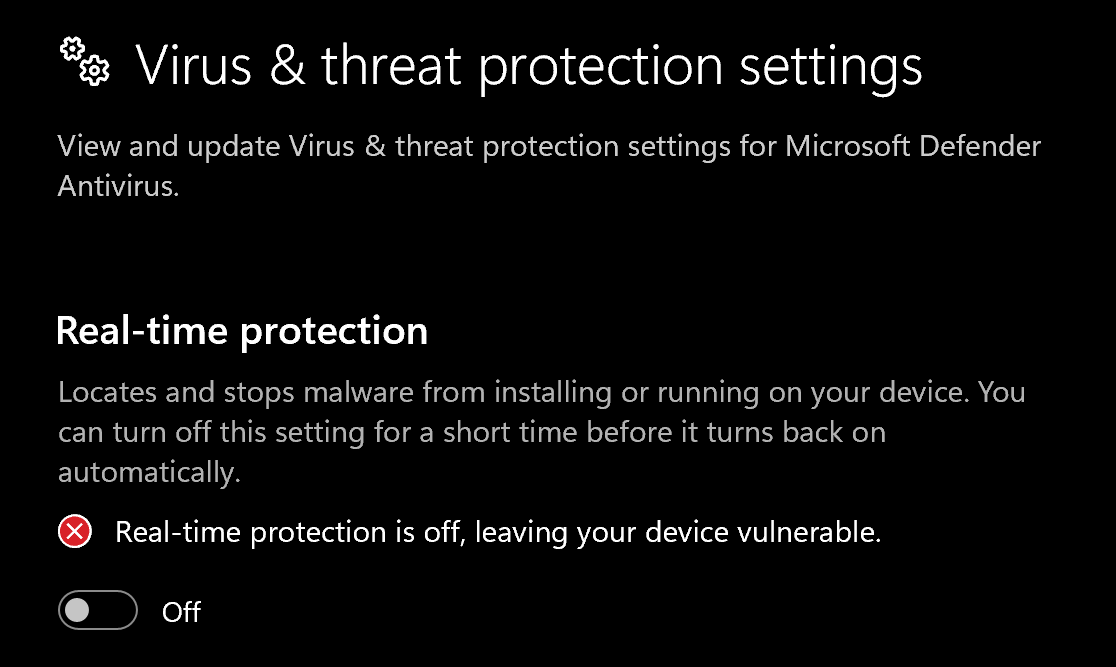
3. Turn off all protection settings:
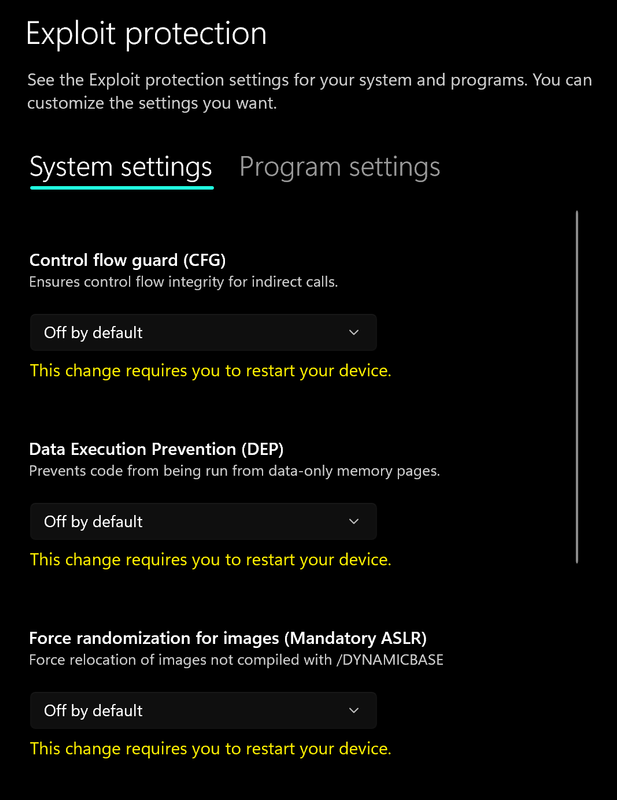
 4. Go to **App & browser control** > **Exploit protection settings**
5. Select **"off by default"** for each option
4. Go to **App & browser control** > **Exploit protection settings**
5. Select **"off by default"** for each option
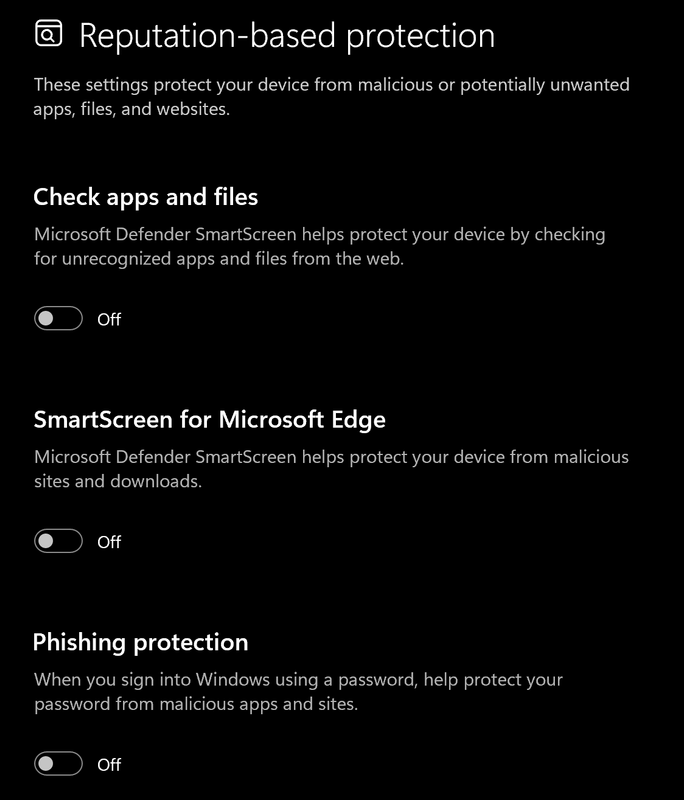
 6. Go to **App & browser control** > **Reputation-based protection settings**
7. Turn off all options
6. Go to **App & browser control** > **Reputation-based protection settings**
7. Turn off all options
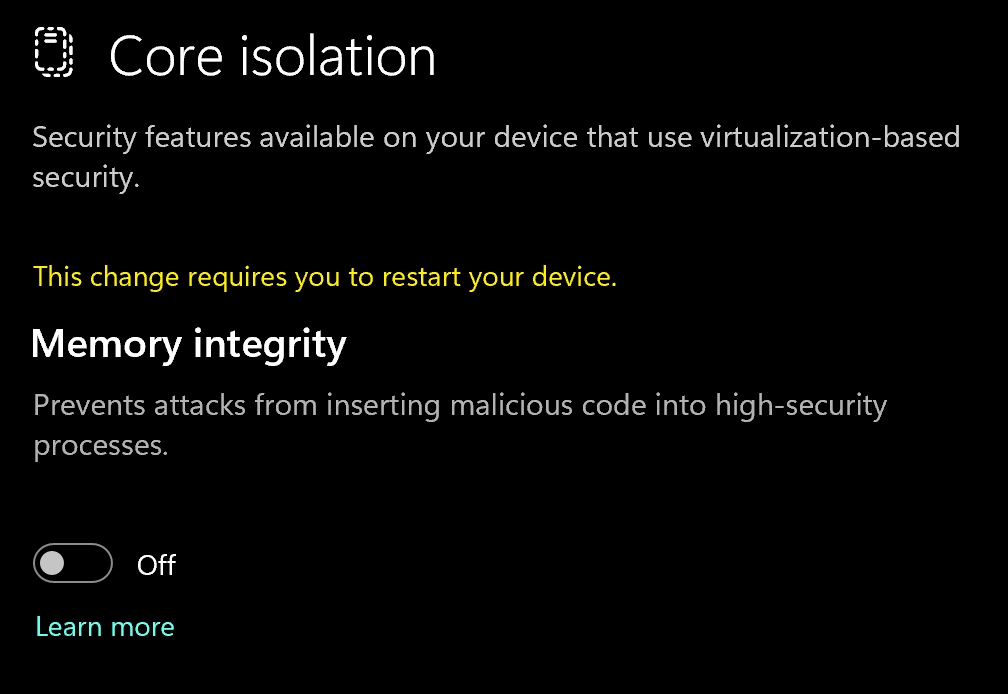
 8. Go to **Device security** > **Core isolation**
9. Turn off **Memory integrity**
8. Go to **Device security** > **Core isolation**
9. Turn off **Memory integrity**
 ### Using DControl
If Windows Defender keeps re-enabling, use DControl:
1. Download [WinRar](https://www.win-rar.com/download.html?\&L=0) and install it. *(Needed to extract archives)*
2. Download [DControl](https://www.sordum.org/files/downloads.php?st-defender-control)
3. Extract the .rar archive with password **"sordum"**
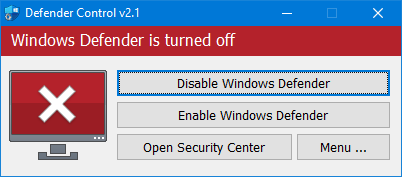
4. Open DControl then press **"Disable Windows Defender"**
### Using DControl
If Windows Defender keeps re-enabling, use DControl:
1. Download [WinRar](https://www.win-rar.com/download.html?\&L=0) and install it. *(Needed to extract archives)*
2. Download [DControl](https://www.sordum.org/files/downloads.php?st-defender-control)
3. Extract the .rar archive with password **"sordum"**
4. Open DControl then press **"Disable Windows Defender"**
 ### Required Files
[https://www.microsoft.com/en-us/download/details.aspx?id=35](https://www.microsoft.com/en-us/download/details.aspx?id=35)
[https://aka.ms/vs/17/release/vc\_redist.x64.exe](https://aka.ms/vs/17/release/vc_redist.x64.exe)
### Discord Overlay Setup
1. Open Discord and go to **User Settings** (gear icon)
2. Navigate to **Game Overlay**
3. Make sure **"Enable in-game overlay"** is turned on
4. Go to **Registered Games**, find **Rust**, and ensure the overlay toggle is **enabled**
5. In the overlay settings, make sure **"Use Legacy Overlay"** is set to **off**
## Cheat Loader Download
Go to [https://codultimate.com/](https://codultimate.com/)
Create an account, if you already have one just login.
Redeem Your License Key
### Required Files
[https://www.microsoft.com/en-us/download/details.aspx?id=35](https://www.microsoft.com/en-us/download/details.aspx?id=35)
[https://aka.ms/vs/17/release/vc\_redist.x64.exe](https://aka.ms/vs/17/release/vc_redist.x64.exe)
### Discord Overlay Setup
1. Open Discord and go to **User Settings** (gear icon)
2. Navigate to **Game Overlay**
3. Make sure **"Enable in-game overlay"** is turned on
4. Go to **Registered Games**, find **Rust**, and ensure the overlay toggle is **enabled**
5. In the overlay settings, make sure **"Use Legacy Overlay"** is set to **off**
## Cheat Loader Download
Go to [https://codultimate.com/](https://codultimate.com/)
Create an account, if you already have one just login.
Redeem Your License Key
 Download loader
 After running the loader as admin, Log In with the account you made.
 * Once it says successfully injected open your game!
* Open and close the menu by pressing Insert
***
## Common Errors
1. Download: [Cloudflare Warp](https://one.one.one.one/)
2. Connect to Warp then try to launch the loader!
Sync your Computer time in Windows Settings
Make sure anti virus and anti cheats are uninstalled.
If the error remains turn off memory integrity
Turn off frame gen and make sure windows text scale is 100%
If that doesn't work try to set your game to borderless. And reinject
***
## Need Help?
If something's not working or you're unsure about a step, just reach out to support and we'll help you out.
[https://onestopcheats.com/support/](https://onestopcheats.com/support/)
* Once it says successfully injected open your game!
* Open and close the menu by pressing Insert
***
## Common Errors
1. Download: [Cloudflare Warp](https://one.one.one.one/)
2. Connect to Warp then try to launch the loader!
Sync your Computer time in Windows Settings
Make sure anti virus and anti cheats are uninstalled.
If the error remains turn off memory integrity
Turn off frame gen and make sure windows text scale is 100%
If that doesn't work try to set your game to borderless. And reinject
***
## Need Help?
If something's not working or you're unsure about a step, just reach out to support and we'll help you out.
[https://onestopcheats.com/support/](https://onestopcheats.com/support/)